Google Ads for beginners: your first Search campaign
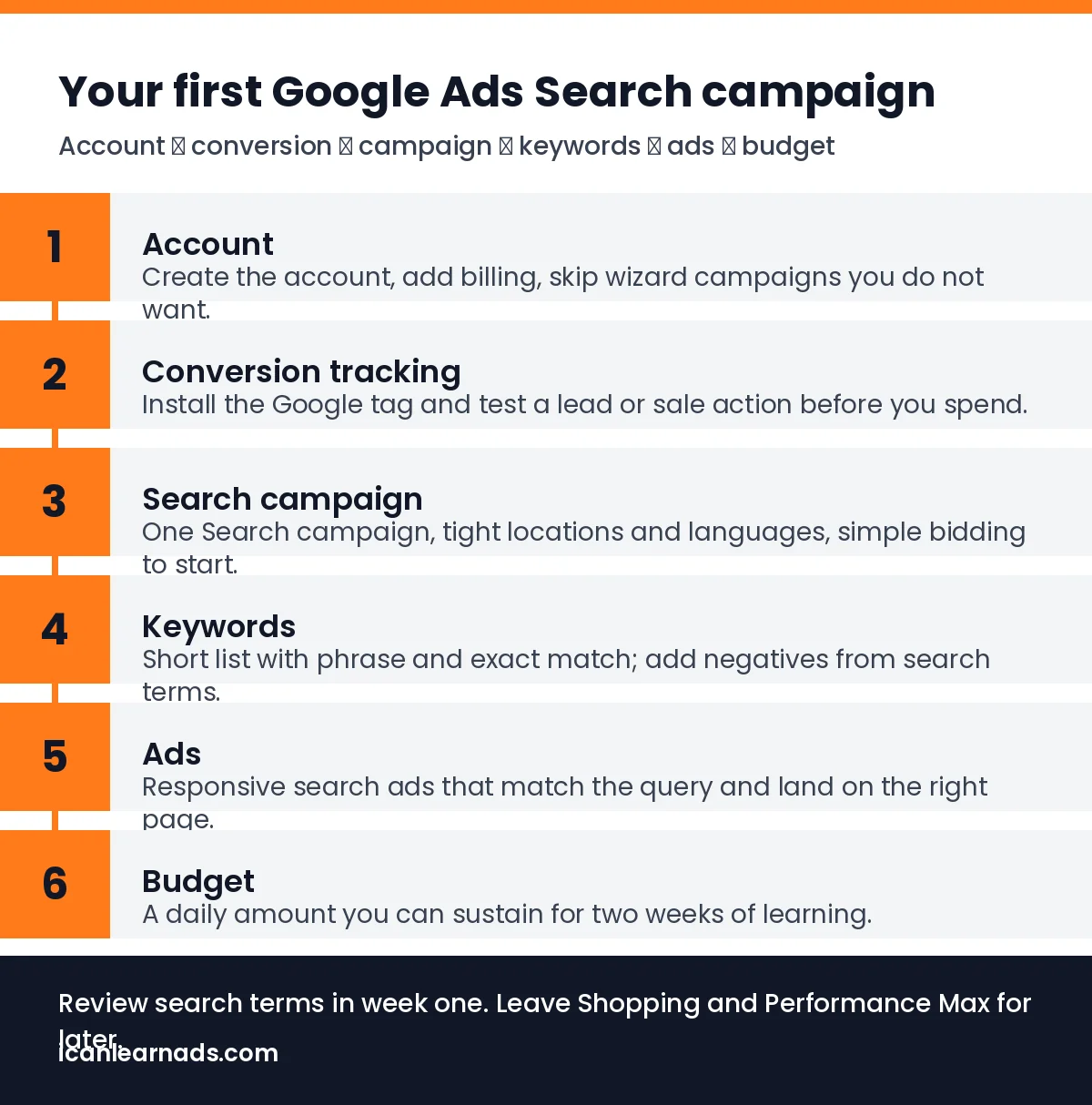
Your first Google Ads Search campaign does not need every feature. Here is the order that keeps setup simple: account, conversions, campaign, keywords, ads and budget.

Google Ads for beginners starts with one Search campaign that shows text ads when people search for what you offer. Set up the account, add conversion tracking, choose a small keyword set, write clear ads and set a daily budget you can learn with. Review search terms in week one. Leave Shopping, Performance Max and Display for later.
Google Ads can feel huge on day one. The product has many campaign types and settings. For a first campaign, you only need Search: people type a query, see your text ad and click through to your site. This guide follows that path in order, with definitions from Google Ads Help where they matter. It does not invent typical CPC or CTR numbers, because those change by market and offer.
What do you need before you open Google Ads?
- A website or landing page that loads on mobile and states the offer clearly.
- A way to know a lead or sale happened (form thank-you page, purchase confirmation or a booked-call page).
- A monthly learning budget you can spend without needing perfect results in week one.
- Access to your domain’s DNS or tag manager if you will install the Google tag yourself.
If tracking is new to you, read tracking setup in plain English first. Knowing your break-even cost per customer also helps you judge whether a click or lead is affordable.
How do you set up the account?
Create a Google Ads account at ads.google.com and complete billing. Google’s own overview of how Google Ads works is a useful orientation. Turn off any automatic “smart” campaign the setup wizard pushes if you want full control of a classic Search campaign. Link Google Analytics if you already use it, but do not delay launch only for a perfect Analytics setup.
Why set conversion tracking before the campaign?
Conversion tracking tells Google Ads which clicks became a lead, booking or sale. Without it, you are buying traffic blind and the system cannot optimise toward results. Install the Google tag (or use Google Tag Manager), then create a conversion action for the event that matters, such as a form submit or thank-you page view. Test it with Google’s conversion diagnostics before you spend.
Google documents creating a campaign and the related setup steps in Help Center articles such as Create a campaign. Use those pages for the current UI labels, because the product interface changes.
How should you structure the first Search campaign?
- Campaign type: Search. One campaign is enough to start.
- Networks: for a clean first test, keep Search partners and Display Expansion off unless you have a reason to turn them on.
- Locations and languages: match where you sell and the language of your site.
- Bidding: start with a simple strategy such as maximize clicks with a max CPC cap, or manual CPC if you want full control. Move to conversion-based bidding only after you have enough conversion data.
- Ad groups: group tightly related keywords together so the ad can match the query.
Which keywords and match types should beginners use?
Start with a short list of phrases a real customer would type: your service plus city if you are local, or the problem your offer solves. Prefer phrase match and exact match at first so you see clearer search-term data. Broad match can wait until conversion tracking and negatives are in place.
After a few days, open the search terms report and add negatives for irrelevant queries. That habit is covered in Google Ads search terms report: how to read it and negative keywords as a weekly habit.
Write keywords the way a customer talks, not the way your industry brochure reads. If you coach busy founders on time management, include phrases they would type at midnight, not only your program name. Keep branded keywords in their own ad group if you bid on your name, so you can see that traffic separately.
What makes a good first Search ad?
Write three responsive search ads per ad group if the UI allows, with headlines that include the main keyword and a clear benefit, and descriptions that state who you help and what to do next. Send traffic to the most relevant page, not always the homepage. Make sure the page matches the promise in the ad so people do not bounce.
Avoid stuffing every headline with the same phrase. Mix the keyword, a proof point you can stand behind, a clear offer and a call to action. Sitelines and callouts help when they add real detail (location, years of experience, what is included). Empty promotion extensions do not fix a weak landing page.
How should you set budget for week one?
Pick a daily budget you can afford for at least two weeks of learning. There is no universal “right” CPC. Instead, compare early cost per conversion with the most you can pay and still break even. If you cannot yet afford enough clicks to learn, pause and fix the offer or page before scaling spend.
Separate learning spend from “this must pay for itself on day three” pressure. Early data is noisy. Your job in week one is to confirm tracking, collect search terms and see whether the ads attract the right queries. Profitability judgments get fairer after you have a clean sample of conversions and have cut waste with negatives.
What should you check after you launch?
- Confirm conversions are recording for real (not only test) submissions.
- Read search terms and add negatives weekly.
- Pause keywords that spend without relevance; keep ones that produce the right queries.
- Improve ads that get impressions but weak click-through relative to your other ads in the same ad group.
- Leave enough time before big edits so you are not reacting to one quiet day.
Also watch the landing page. If clicks arrive and bounce, fix the page before you raise budget. Slow load time, a vague headline or a form that asks for too much will waste good keywords. The ad and the page have to tell the same story.
When should you get help instead of staying DIY?
Stay DIY while you are learning the interface and your offer is still changing. Bring in help when spend, complexity or opportunity cost exceeds what you can manage. Spencer Digital’s guide on when to hire a paid ads agency and their services page outline what an agency should own. For free lessons while you practise, use our Meta and Google Ads training.
A simple first-campaign checklist
- Account and billing ready.
- Conversion action tested.
- One Search campaign with tight ad groups.
- Phrase and exact keywords plus a starter negative list.
- Responsive search ads pointing at the right page.
- Daily budget you can sustain for two weeks.
- Calendar reminder to review search terms after a few days.
Frequently asked questions
What is the best first campaign type in Google Ads?
Search. It shows text ads for queries people already type. Add Shopping, Display or Performance Max later, once tracking and a simple Search setup are working.
Do I need conversion tracking before I spend?
Yes if your goal is leads or sales. Without conversions, you cannot see which keywords pay off and Google Ads cannot optimise toward results.
Should beginners start with broad match?
Usually no. Phrase and exact match give clearer search-term data at the start. Add broad match later with strong conversion tracking and negatives.
How much should I spend on my first campaign?
Spend only what you can afford to learn with for at least two weeks. Compare cost per conversion with your own break-even number rather than any published average CPC.
Want the whole system?
The free training walks through every step in five short lessons, with the Ad-Ready Playbook.
Start the free training